 |
|
|
|
Troubleshoot ShowMyPC
|
Please Select a Product
Latest: 5125
Latest: 5126
Latest: 3825
Quick Tips:
Have you tried connecting from another PC or network? It can be difficult to isolate problems specific to one location.
Rebooting the PC may help terminate any conflicting programs.
Access Home or Office PC
Before you install.
Ensure you have the latest version 5125.
Ensure you have all Windows Updates installed.
If your antivirus software prevents downloading or installing the file, please temporarily disable it for 15 minutes.
Ensure you are logged in as a Windows administrator on the machine where you are installing the service.
While installing the Access Home or Office Service, UAC (User Account Control) should be turned on.
Verify that the date and time on your PCs are correct (required for built-in security features).
To avoid conflicts, enter your hostname and email address in lowercase.
Watch for any warning messages or pop-up dialogs from your firewall or antivirus software.
Unable to connect, or don't see your Remote PC in the list.
Ensure you have installed the service following the instructions in the email sent to you.
Verify that your remote PC is still connected to the network and is not in sleep or hibernate mode.
Using the HTML Viewer can help if the desktop Viewer program is having trouble connecting.
Quick test: Have someone reboot the remote PC; it should reappear in your list afterward.
If the problem persists, reinstall the service on the remote PC.
Other VNC viewer applications can conflict with ShowMyPC.
If the problem persists, try viewing from another PC to determine if the issue is isolated to a specific machine.
If none of these steps help, send us a debug report from the application: "Options > Debug > Send Report".
Seeing multiple windows or toolbars.
If you are seeing multiple windows or toolbars, you may be accidentally connecting to yourself. See instructions here to fix this.
My Remote PC shows a red cross or is missing (Offline), but it was working earlier.
Verify that your remote PC is still connected to the network and is not in sleep or hibernate mode.
Quick test: Have someone reboot the remote PC; it should reappear in your list afterward.
If the problem persists, reinstall the service on the remote PC.
If the problem persists, try viewing from another PC to determine if the issue is isolated to a specific machine.
If none of these steps help, go to "Options > Debug Report" in the application and open a support ticket.
Forgot your remote access password?
You can either reinstall the service to physically set a new password on the PC, or use the "Reset Password" feature from the PC service management link to receive a reset email at the address associated with that device.
Can I rename the downloaded exe?
Changing the name of the original .exe file will cause the program to malfunction or return an error.
To rename the file without causing errors, create a shortcut to the original .exe and rename that shortcut instead.
Advanced Troubleshooting.
If you receive an authentication error, ensure you are using the correct combination of Hostname, Email, and Password (these are case-sensitive).
Ensure internet access is working on both the Viewer and the Remote PC.
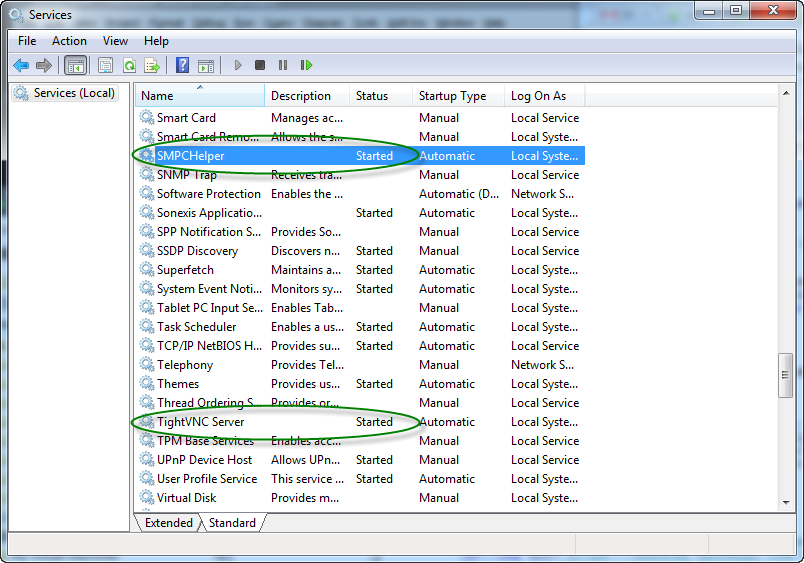
Check your services by going to "Start > Services".
Ensure both the "SMPCHelper" and "TightVNC Server" services are running.
Remote Support and Meetings
What is your application version?
Ensure you have the latest version 5126.
I just purchased the service and am not sure what to do.
Ensure you received the instructions in your email (it may take a few minutes). If not, contact ShowMyPC Support.
You need two PCs to use this service. See our guide on how to use it.
For advanced configuration of the support application, refer to the details in your email.
My paid version is not working.
Check for any outage notices on the ShowMyPC Support page.
Ensure you are not connected to a VPN.
It can be difficult to debug issues on a specific PC; try using another PC.
Rebooting may help fix the problem by closing any conflicting programs.
ShowMyPC does not work within an RDP or Windows Remote Desktop session.
Some firewalls or antivirus software may block ShowMyPC. Please ensure your antivirus software is updated and allows ShowMyPC.
Recently installed software might conflict with ShowMyPC.
Using other VNC viewers can conflict with ShowMyPC.
If none of these steps help, send us a debug report from the application: "Options > Debug > Send Report".
Can I rename the downloaded exe?
Changing the name of the original .exe file will cause the program to malfunction or return an error.
To rename the file without causing errors, create a shortcut to the original .exe and rename that shortcut instead.
Free Version
What is your application version?
Ensure you have the latest version 3825.
The Free Version is not working.
It can be difficult to debug issues on a specific PC; try using another PC.
Rebooting may help fix the problem by closing any conflicting programs.
Recently installed software might conflict with ShowMyPC.
Using other VNC viewers can conflict with ShowMyPC.
Firewalls or antivirus software may block ShowMyPC. Note that automatic updates to these programs can sometimes cause them to start blocking the application.



Contact